Computer Tips From A Computer Guy |

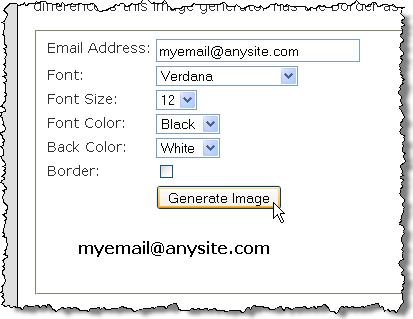
| How to Mask Your Email Address Posted: 12 Feb 2010 03:06 AM PST If you want to display your email address on your website, but you want to avoid spiders, robots, or spammers from finding it and sending you junk mail, you might want to try one of the following two websites. They generate either an ASCII version or a JPG version of your email address, which essentially hides your email address. Mask Email Image GeneratorUse the Mask Email Image Generator to create a JPG image of your email address. It will fool spiders that seek out email addresses for use in sending out spam. Enter your email address in the form and specify the Font, the Font Size and Font Color, and the background color (Back Color). If you want a border around the email address, select the Border check box. For the Font Color and the Back Color, you are provided with some basic colors. NOTE: Be sure you save the image file to your computer. Images on Mask Email Image Generator are deleted every three minutes, therefore, you cannot link back to the image on their site. To save the image, right-click on the image and select Save Image As from the pop-up menu and use the Save Image dialog box to save your image to a chosen location on your computer. Now you will have an image file you can insert into your website wherever you would normally place a mailto: link for people to email you. Most spiders crawling the web for email addresses to use for sending spam should not be able to find your email address. Mask Email ASCII GeneratorThe Mask Email ASCII Generator creates an ASCII representation of your email address. Fill out the form on the page and click the ASCII Encode button To get your link, highlight the text in the Cut and Paste Below section and copy it. You can paste this link text into your webpage where you would normally place your mailto: links. You might want to paste it into a text file for storage and later use. There is also a link under Test ASCII Link so you can make sure the link works correctly. This ASCII link for your email should fool most spiders. by Lori Kaufman
Related postsCopyright © 2007 Online Tech Tips. Aseem Kishore (digitalfingerprint: a59a56dce36427d83e23b501579944fcakmk1980 (74.125.158.82) ) Post from: 
       |


| You are subscribed to email updates from Online Tech Tips To stop receiving these emails, you may unsubscribe now. | Email delivery powered by Google |
| Google Inc., 20 West Kinzie, Chicago IL USA 60610 | |

