Computer Tips From A Computer Guy |

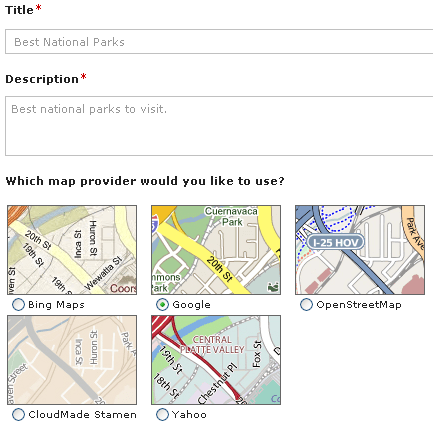
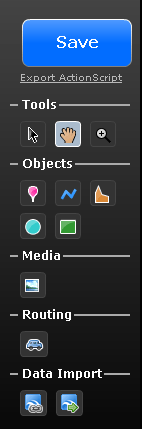
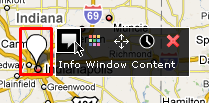
| Create your own personalized maps online using UMapper Posted: 17 Oct 2009 03:23 AM PDT Do you know your neighborhood or city like the back of your hand? Maybe you know all the best pizza places in the city or all the hole-in-the-wall restaurants that you know people would love to eat at? Whatever you reason, it would be cool to create your own online maps that you can then share and monetize for free, right? Or maybe you have a website and you want to create an online map and then embed it in your blog? UMapper is a cool online service that lets you create custom maps online and then share them with others or embed them onto your site. Check out this map below of the best pizza places to eat at in Boston: Pretty neat eh!? And it's super easy to make! Just click the Create Map link at the top and then give your new map a name, a description and choose which map provider you would like to use. You can choose from Bing maps, Google maps, OpenStreetMap, CloudMade, and Yahoo maps. Next a map of the entire world will load up and you can begin creating your custom map using the tools on the right hand side: Under objects, you can add markers, lines, circles, rectangles, and polygons. You can add text to any of these objects. Under Media, you can add images. If you'd like to add directions between two addresses, you can add a route under the Routing heading. If you have a map data feed that is in KML, GPX or GeoRSS format, you can also import that data right into your map. When you add a marker or different object onto the map, you will see all the options when you hover over it, such as adding text, changing the color, etc. UMapper Basic is free for personal maps and for embedding onto your website. If you want to create fancier maps or maps for commerical use, you can upgrade to Premium. This lets you brand the maps with your own logo and custom templates and also lets you control whether or not you want ads to show up in the maps. Other features include access to the premium content data layers and revenue share is you decide to show ads. Overall, it's a pretty neat site for those occasions where you need to quickly create a map and share it with a bunch of people. Enjoy!
Related postsCopyright © 2007 Online Tech Tips. Aseem Kishore (digitalfingerprint: a59a56dce36427d83e23b501579944fcakmk1980 (74.125.44.136) ) Post from: 
       |

| You are subscribed to email updates from Online Tech Tips To stop receiving these emails, you may unsubscribe now. | Email delivery powered by Google |
| Google Inc., 20 West Kinzie, Chicago IL USA 60610 | |

