Computer Tips From A Computer Guy |
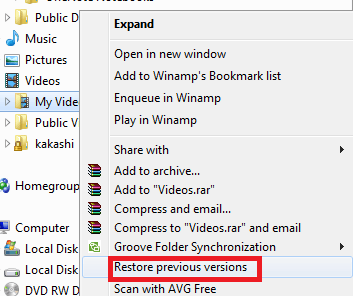
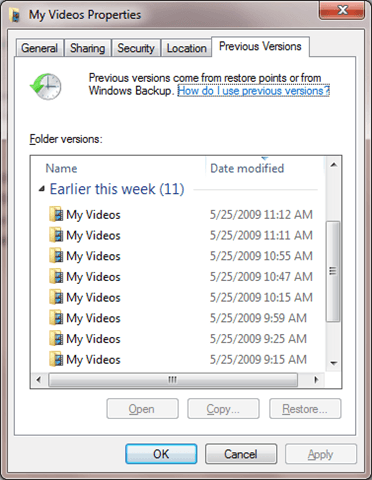
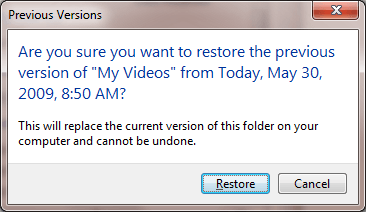
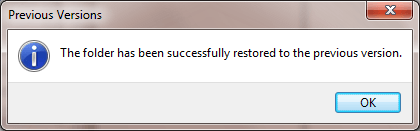
| How to restore a folder’s previous version in Windows 7 Posted: 09 Jun 2009 03:15 AM PDT In Windows 7 there is a new feature that will let you restore previous versions of the contents of a folder. For example, if you have a folder containing some files from last week, then you update the contents of the folder this week, you can still go back to the old version of the files. This new feature is called restoring previous versions. Previous versions are either copies of files and folders created by Windows Backup or copies of files and folders that Windows automatically saves as part of a restore point. You can use previous versions to restore files and folders that you accidentally modified or deleted, or that were damaged. Depending on the type of file or folder, you can open, save to a different location, or restore a previous version. Note: If you modify a file several times in one day, only the version that was current when the restore point or backup was made is saved as a previous version. To restore from a previous version, right click a folder then choose Restore previous versions. You’ll see a list of available previous versions of the file or folder. The list will include files saved on a backup (if you’re using Windows Backup to back up your files) as well as restore points. Before restoring the previous version select the version first and click Open. This way you can check if the version you want is correct before you restore it. Once you checked that it is the right version click the restore button and it will be restored to it's original location. Be careful when using restore because this cannot be undone. Once restored, verify the contents by exploring the folder. This is a big improvement from XP since previously you had no way of doing this without a third party versioning tool or without Windows Server 2003.
Related postsCopyright © 2007 Online Tech Tips. Aseem Kishore (digitalfingerprint: a59a56dce36427d83e23b501579944fcakmk1980 (74.125.112.136) ) Post from: How to restore a folder's previous version in Windows 7
       |
| You are subscribed to email updates from Online Tech Tips To stop receiving these emails, you may unsubscribe now. | Email delivery powered by Google |
Inbox too full?  | |
| If you prefer to unsubscribe via postal mail, write to: Online Tech Tips, c/o Google, 20 W Kinzie, Chicago IL USA 60610 | |

